
 English
 اللغة العربية
  Bahasa Indonesia
  日本語
日本語  Bahasa Melayu
  ภาษาไทย
  Tiếng Việt
  简体中文
简体中文 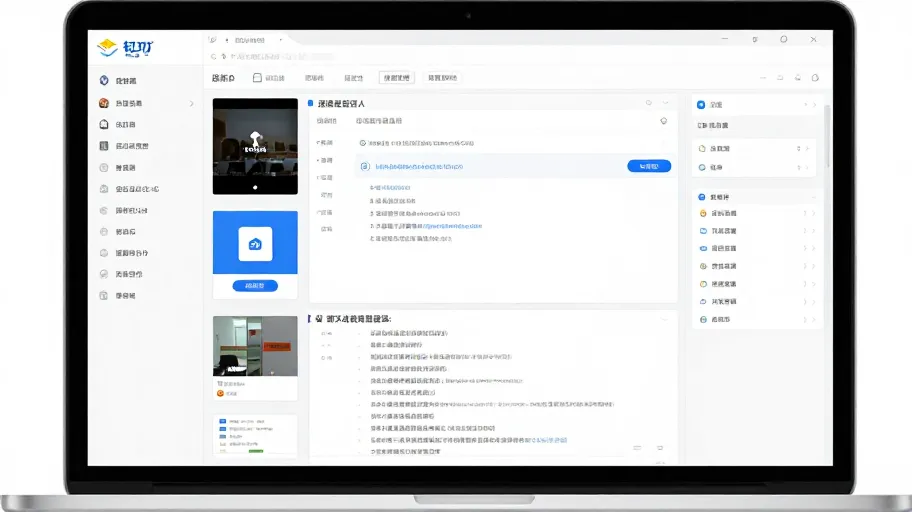
Every day, when you open your office software, what greets you is often this scene: instant messages filled with piles of screenshots and temporary spreadsheets; at the edges of chat windows, scattered unprocessed approvals and forgotten to-dos; and meeting notes endlessly shuffled back and forth within documents.
Information, files, and tasks naturally accumulate on the digital desktop.
Many people blame this on users' lack of organization. But in reality, it's not entirely due to laziness.
The root cause lies in the fact that a single digital space organization method inherently struggles to balance "quick note-taking" with "maintaining order."
Workflows are continuous, yet information is fragmented. We communicate through instant messages, store ideas in documents, schedule events in calendars, and process approvals. When these basic capabilities aren't properly integrated, they end up becoming isolated information islands.
To meet deadlines, we instinctively drag files into chat windows or toss links into our to-do lists. This reflexive "patchwork" approach only accelerates the chaos on an already crowded workspace.
What we need isn't a bottomless pit capable of holding everything, but rather a workspace that knows how to exercise restraint and guide our attention back to the main task at hand.
When tools merely pile up endless features without purpose, chaos becomes inevitable.
It's time to rethink what true order really means for a digital workspace.
A Workspace Needs More Than Just Piled-Up Features
A good office tool shouldn't trap users inside complex systems.
Trying to solve every problem with one massive piece of software often ends up making even the simplest note-taking feel burdensome. What a workspace truly needs is never an endlessly stacked feature panel.
In DingTalk, I prefer to think of its core capabilities as "digital furniture."
To-dos aren't bloated project management systems—they simply help quickly jot down tasks and reserve a spot in the calendar. Documents don't have to be rigid knowledge bases either; they're more like blank sheets of paper spread out on the desk, holding ideas that haven't fully taken shape yet.
As for instant messaging and approvals, they provide restrained access points.
After a meeting, you can easily create a to-do item; during communication, you can directly initiate a simple approval request. No need to switch between apps or adapt to new workflows. Even routine functions like attendance tracking and video conferencing excel precisely because they're right there when needed—yet quiet enough when not required.
Just enough functionality is all that's necessary.
The point of a tool is to return focus to the task at hand, not to constantly assert its presence with red dots and pop-up notifications.
However, such basic restraint is only the first step. As business needs grow more complex and standard, everyday capabilities fail to cover long-tail scenarios—so what should we do then?
Should we keep stuffing the workspace with bulky modules, or seek a lighter, more flexible way to extend its capabilities?
An Ecosystem Boundary That's Neither Completely Closed Nor Totally Chaotic
When faced with long-tail scenarios, the most instinctive reaction is to "add more features." But turning a workspace into an all-encompassing behemoth only doubles the confusion.
I used to try cramming various complicated modules into the system, only to find myself reluctant even to open it. The real solution lies in setting clear boundaries of restraint.
This is where DingTalk's open ecosystem shines. It allows third-party AI assistants and smart work agents to integrate—but with one invisible condition: they must not disrupt the existing order.
When business requires in-depth information processing, there's no need to leave the app. Third-party AI office tools can directly refine and circulate information within DingTalk itself.
For example, after analyzing lengthy project documentation, a smart work agent won't pop up a flashy new window forcing you to read—it will instead condense key findings into a subtle message card and deliver it straight to your instant messages. Or, based on critical milestones in the document, it might automatically add an event to your calendar or set a reminder in your to-do list.
Features expand, but interactions always stay aligned with DingTalk's native experience rhythm—message cards arrive lightly, action buttons remain clearly accessible, without interrupting the current workflow.
Once third-party tools connect, they don't forcibly hijack your attention. Instead, they return complex information relationships to DingTalk's fundamental building blocks: messages, to-dos, and documents. When needed, they're right there; once finished, they quietly retreat to the background, leaving no trace of disruption.
Open ecosystems are never about mindlessly piling on features.
Not completely closed, so capabilities can grow; not totally chaotic, so order can be preserved. Within these boundaries, tools gently supplement functionality, while humans remain the true protagonists of their work.
Doing More Doesn't Necessarily Mean Better Usability
I've seen too many teams whose workspaces resemble utility poles plastered with small advertisements.
Today, they add a reporting module; tomorrow, a clock-in feature; the next day, several third-party AI assistants. In enterprise digitalization, it's easy to fall into the anxiety of "filling whatever gaps appear."
I used to want to pack every conceivable function onto the homepage, only to find myself unable to even click through an interface overloaded with dozens of icons.
It wasn't laziness—it was broken information hierarchy.
After stopping to reassess, I realized a simple truth: only architectures that feel comfortable over the long term are suitable for teams. And comfort often comes from restraint.
DingTalk, as a foundational platform, already offers essential capabilities like approvals, attendance tracking, document management, video conferencing, instant messaging, calendars, and to-dos. These common-sense features are sufficient to support daily operations. It neither needs nor should attempt to replace every specialized application.
For deeper business requirements, simply connect to professional systems and use them alongside DingTalk.
Let financial systems handle accounting, and development tools manage code. DingTalk just needs to send an approval notification at crucial moments or add an event to your calendar. Some needs can be met through multi-device usage and seamless system integration—no need to clutter the interface with unnecessary buttons.
Products require boundaries. Adding more often means heavier, messier interfaces.
A good digital workspace doesn't violently cram all tools into one box; instead, it knows when to stop and returns focus to the person doing the work.
Knowing when to pause brings true composure.
Order Is a Gentle Patch, Not a Violent Replacement
Digital spaces give us vast worktables, yet they rarely teach us how to organize them effectively.
Messages, documents, and to-dos surge forward like waves, leaving users feeling overwhelmed by the sheer volume of information. This isn't solely due to laziness—it's because the system itself lacks a layer of disciplined storage logic.
DingTalk hasn't tried to reinvent a sprawling, complicated system. Rather, it's like gently applying a patch to a chaotic digital desktop.
I once attempted to squeeze many heavy-duty tools into the platform, only to discover that it actually suits teams who prefer quick access to frequently used functions and lightweight handling of to-dos and documents. It doesn't aim to do everything—it simply puts the most basic elements back in their proper place.
Files have designated spots, documents are always within reach; to-dos are clearly visible, reminding you of the next step; instant messages and calendars are readily accessible, and video conferences can be joined with a single tap. Even when paired with third-party smart work agents, these tools offer assistance only when needed, never overshadowing the primary workflow.
Of course, it's not suited for scenarios requiring extreme customization or those hoping to completely replace specialized professional systems. When business enters deeper waters, let professional systems handle what they do best.
Order has never meant binding people with intricate rules—it's about letting everything return to its natural state.
Call up the interface when needed, and once the task is done, return your attention to what's right in front of you.
When everything finds its rightful place, that's the best kind of order.
We dedicated to serving clients with professional DingTalk solutions. If you'd like to learn more about DingTalk platform applications, feel free to contact our online customer service or email at
Using DingTalk: Before & After
Before
- × Team Chaos: Team members are all busy with their own tasks, standards are inconsistent, and the more communication there is, the more chaotic things become, leading to decreased motivation.
- × Info Silos: Important information is scattered across WhatsApp/group chats, emails, Excel spreadsheets, and numerous apps, often resulting in lost, missed, or misdirected messages.
- × Manual Workflow: Tasks are still handled manually: approvals, scheduling, repair requests, store visits, and reports are all slow, hindering frontline responsiveness.
- × Admin Burden: Clocking in, leave requests, overtime, and payroll are handled in different systems or calculated using spreadsheets, leading to time-consuming statistics and errors.
After
- ✓ Unified Platform: By using a unified platform to bring people and tasks together, communication flows smoothly, collaboration improves, and turnover rates are more easily reduced.
- ✓ Official Channel: Information has an "official channel": whoever is entitled to see it can see it, it can be tracked and reviewed, and there's no fear of messages being skipped.
- ✓ Digital Agility: Processes run online: approvals are faster, tasks are clearer, and store/on-site feedback is more timely, directly improving overall efficiency.
- ✓ Automated HR: Clocking in, leave requests, and overtime are automatically summarized, and attendance reports can be exported with one click for easy payroll calculation.
Operate smarter, spend less
Streamline ops, reduce costs, and keep HQ and frontline in sync—all in one platform.
9.5x
Operational efficiency
72%
Cost savings
35%
Faster team syncs
Want to a Free Trial? Please book our Demo meeting with our AI specilist as below link:
https://www.dingtalk-global.com/contact
